Snapseed QR codes are revolutionizing the way photographers and creators approach mobile photo editing. This feature within the popular Google-owned app allows users to package an entire series of edits into a scannable code. Whether you’re a professional seeking consistency or a hobbyist looking to explore new styles, understanding Snapseed QR codes can transform your editing workflow, making it faster and more collaborative than ever before.
What Exactly Are Snapseed QR Codes?
A Snapseed QR code is essentially a digital preset that is embedded within a QR code. Unlike traditional QR codes that link to a webpage, these specific codes store the exact adjustments made to a photo. This includes everything from basic tweaks like brightness and contrast to complex filters and selective adjustments . When you create a preset you love, the app generates a Snapseed QR code that can be saved or shared, allowing anyone to apply the same look with a single scan. This innovative system eliminates the need for manual recreation of edits, making it a powerful tool for style sharing and workflow efficiency .
How to Create Your Own Snapseed QR Codes
Creating your own Snapseed QR codes is a straightforward process that allows you to build a personal library of signature styles. After you have finished editing a photo, tap the menu icon in the top right corner of the screen (it looks like three vertical dots). From the dropdown, select the “QR Look” option and then choose “Create QR Look” . The app will then generate a unique Snapseed QR code representing all the edits you have just made. You can then save this code as a JPEG image to your device or share it directly with friends and social media followers. Additionally, Snapseed allows you to choose color schemes for your QR code, adding a layer of aesthetic customization to your shared presets .
How to Scan and Apply Snapseed QR Codes
Applying a preset via Snapseed QR codes is as simple as creating one. To apply a filter, open the photo you wish to edit in the app. Next, tap the menu icon and choose “QR Look” again, but this time select “Scan QR Look” . The app will activate your camera, allowing you to point it at the Snapseed QR code. Alternatively, you can upload a QR code image directly from your phone’s gallery . Once scanned, Snapseed will instantly apply all the encoded editing settings to your image. This instant application is a massive time-saver, allowing for rapid experimentation with different styles from the community .
The Best Snapseed QR Codes for Popular Styles
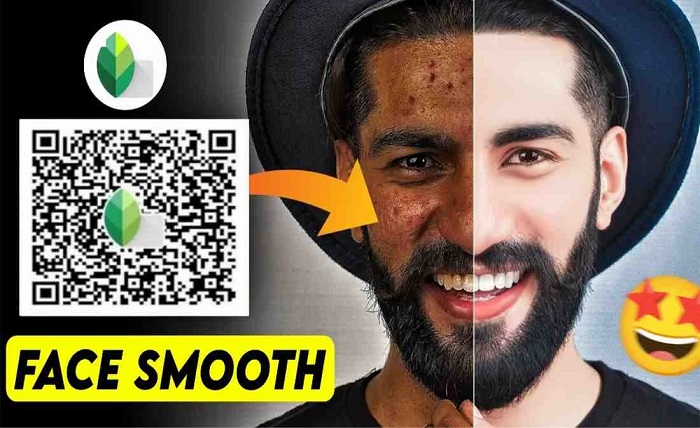
One of the most exciting aspects of Snapseed QR codes is the ability to find and apply top-quality presets created by other users. The community has generated a vast array of codes for various photography genres. For a classic, timeless feel, a Black and White Snapseed QR code can add a moody monochromatic effect with balanced highlights and shadows . If you are looking for a warm, nostalgic vibe, Vintage Effect and Film Effect codes add yellow haze, grain, and subdued tones reminiscent of analog photography . For portraits, specific Face Smooth Snapseed QR codes are available to reduce blemishes while maintaining a natural look. These styles are often shared on platforms like Pinterest, Reddit, and various photography forums .
Maximizing Workflow Efficiency with QR Code Presets
The primary benefit of using Snapseed QR codes is the significant boost in editing efficiency. Instead of spending minutes manually adjusting sliders for every photo, you can achieve a professional look in seconds. This is incredibly valuable for projects requiring a consistent aesthetic across multiple images, such as maintaining a cohesive Instagram feed or editing a collection for a client . By utilizing Snapseed QR codes, you can ensure that your work maintains a high level of uniformity. This automation of complex edits allows you to focus more on the creative aspects of photography and less on repetitive technical tasks .
Collaboration and Community via QR Code Sharing
Beyond personal efficiency, Snapseed QR codes foster a powerful sense of community and collaboration. Photographers can easily share their unique editing styles with peers, eliminating the need for lengthy tutorials or complex file transfers . For team environments, using a shared Snapseed QR code ensures everyone edits photos in the same style, promoting brand consistency and authenticity across all visual materials . Whether you are a social media influencer sharing your signature look or a professional photographer providing presets to a client, the ability to share Snapseed QR codes has made creative collaboration simpler and more effective .
A World of Snapseed QR Codes for Any Occasion
The versatility of Snapseed QR codes means there is a preset available for almost any photographic scenario. For travel and landscape photography, Vibrant Effect or High Definition Snapseed QR codes can enrich colors and sharpen details, perfect for nature and cityscape shots . If you are facing challenging lighting conditions, a Night Photo preset can help adjust harsh lights and blend darker areas . Those who prefer a more dramatic, artistic touch can use the Moody Tones or Aesthetic Look codes, which play with contrast and saturation to create a dynamic feel . This wide range ensures that you can always find the perfect Snapseed QR code to match your specific creative vision.
Conclusion
Snapseed QR codes are a testament to the innovation in mobile photography, blending powerful editing with modern sharing technology. They provide a seamless bridge between efficiency and creativity, allowing users to replicate professional edits in an instant. By understanding how to create, scan, and share these codes, you gain access to a global community of styles while dramatically speeding up your workflow. Whether you are looking to maintain brand consistency or simply explore new aesthetics, integrating Snapseed QR codes into your photo editing routine is a smart and effective move for any creator.
FAQs
How do I create a QR code for my edits in Snapseed?
After you finish editing, tap the menu icon (three dots) in the top right corner, select “QR Look,” and then choose “Create QR Look.” You can then save or share the generated code.
Can I load Snapseed QR codes from the same device?
No, you cannot load a QR code from the same device. You need to open the QR code on an external screen or another phone and manually scan it with the phone you are using to edit .
Where can I find new Snapseed QR codes to try?
You can find a wide variety of Snapseed QR codes on platforms like Pinterest, Reddit, and photography forums. Social media platforms like Twitter and Facebook also have communities where users share their presets .
Is the Snapseed app and its QR code feature free to use?
Yes, Snapseed is completely free to download and use, with no hidden costs associated with its core functionality, including the QR code preset feature .
What happens after I scan a Snapseed QR code?
Once scanned, the app will automatically apply the exact editing settings from the QR code to your current photo. You can then save the photo or continue to fine-tune the edits to your preference